Automatic Content Extraction from Web Pages and Word Cloud Visualization
May 4, 2018Felix Zhao中文1.2k words~7 min readViews:
This post was written in 2018. Tools and versions mentioned may be outdated, though the underlying ideas still hold.
Recently got a batch of data that needs analysis. The usual approach would be to parse and process it with bs4 to extract content. However, I’d heard about automatic web content extraction before, so I decided to give it a try. Using CxExtractor from cx-extractor-python
The automatic web content extraction methods I know of are:
Based on line block distribution
Based on text density
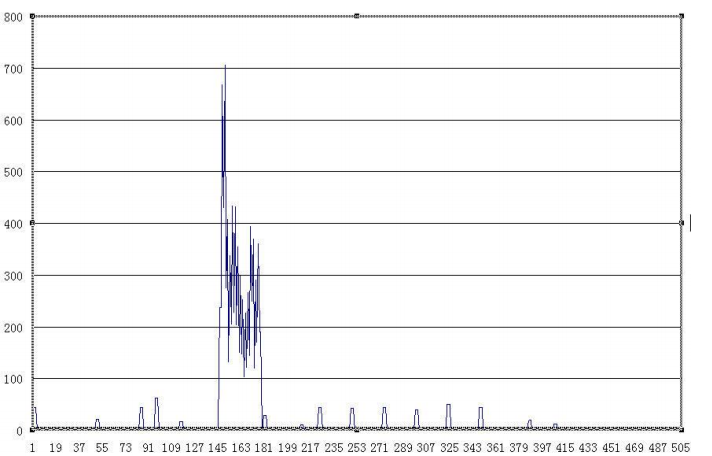
The method tried in this post is based on line block distribution. CxExtractor
Read -> Extract -> Filter, that’s it
import re import chardet import requests
classCxExtractor: """cx-extractor implemented in Python"""
defreadHtml(self, path, coding): page = open(path, encoding=coding) lines = page.readlines() s = '' for line in lines: s += line page.close() return s
deffilter_tags(self, htmlstr): re_nav = re.compile('<nav.+</nav>') re_cdata = re.compile('//<!\[CDATA\[.*//\]\]>', re.DOTALL) re_script = re.compile( '<\s*script[^>]*>.*?<\s*/\s*script\s*>', re.DOTALL | re.I) re_style = re.compile( '<\s*style[^>]*>.*?<\s*/\s*style\s*>', re.DOTALL | re.I) re_textarea = re.compile( '<\s*textarea[^>]*>.*?<\s*/\s*textarea\s*>', re.DOTALL | re.I) re_br = re.compile('<br\s*?/?>') re_h = re.compile('</?\w+.*?>', re.DOTALL) re_comment = re.compile('<!--.*?-->', re.DOTALL) re_space = re.compile(' +') s = re_cdata.sub('', htmlstr) s = re_nav.sub('', s) s = re_script.sub('', s) s = re_style.sub('', s) s = re_textarea.sub('', s) s = re_br.sub('', s) s = re_h.sub('', s) s = re_comment.sub('', s) s = re.sub('\\t', '', s) # s = re.sub(' ', '', s) s = re_space.sub(' ', s) s = self.replaceCharEntity(s) return s
You can click over to take a look, not hard to understand, and it’s pretty simple to use in my scenario. However, the results weren’t perfect for my use case. That’s because the HTML here is in report format, and the extracted mobile data includes everything - WeChat chat records, deleted data, basically all the data. The report format is very structured, there’s no so-called large main body, most of the data is very regular. So the results aren’t 99% perfect, but they’re already pretty good. Just need a bit more processing. Saved a lot of time.
defparserfile_auto(htmlpath): html = cx.readHtml(htmlpath, coding='utf-16le') content = cx.filter_tags(html) s = cx.getText(content) return s
import os for html in htmls: text = parserfile_auto(html) # text = parserfile(html) withopen('./phone-text-auto/'+os.path.basename(html) + '.txt', 'w', encoding='utf-8') as textfile: # t = "\n".join(text) textfile.write(text)
After extracting the data, you can do word segmentation, keyword extraction, and then generate a word cloud for visualization. One issue here is that if you want to display Chinese characters, wordcloud can’t do it by default - you need to specify the font path.
#coding:utf-8 import matplotlib.pyplot as plt from wordcloud import WordCloud import jieba import re import jieba.analyse # jieba.load_userdict('./dict.ji') jieba.enable_parallel(4) withopen('./zhongwen.txt', errors='ignore') as f: text_from_file_with_apath = f.read()
defstopwordslist(filepath): stopwords = [line.strip() for line inopen( filepath, 'r', encoding='utf-8').readlines()] return stopwords
stopwords = stopwordslist('./dict.jieba')
for i in stopwords: text_from_file_with_apath.replace(i, " ") jieba.add_word(i)
I won’t post the word cloud image here. For association analysis, I think there are several areas worth exploring: anomaly detection, transaction record analysis, chat history analysis, and text topic modeling. Obviously, analyzing this kind of data reminded me of the Trump Twitter analysis in neo4j‘s sandbox - there’s a lot of similarity there.