“Build once (Docker), deploy everywhere.” — yeah, I’m never saying that again.
1. Design
Collected requirements, broke them down, set a budget, wrote a BRD, made an HLS, and drew up a UI in Figma. Then for various reasons the budget fell through, so I had to jump in and build it myself.
Since I was writing it solo, I had to redesign the tech stack from scratch. I went with Python: Flask for the web layer, Celery for async task scheduling. The catch was that CFCA’s platform only had a Java SDK, so I had to wrap the business logic into an API service separately, then call that from Flask. For the database, I used an ORM to make testing and migration easier — SQLite in dev, Postgres in prod.
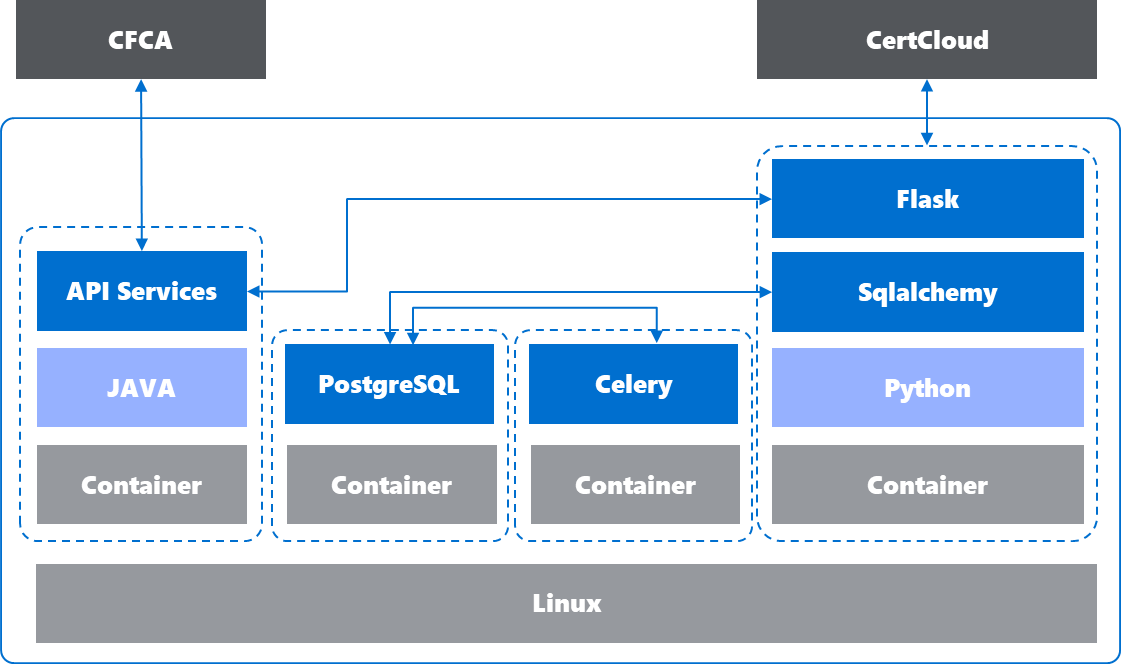
I didn’t diagram the frontend structure, but it basically has: User Panel, Key Management Panel, Certificates Management Panel, Crypto Box Panel, Financial Panel, etc. Each panel shows a list of keys/certs, with a search box at the top. Click into any list item and you get a detail page with management actions.
2. Build Infra
The internal resource request process at work is a nightmare, AI tools aren’t allowed, and my platform doesn’t touch any internal company data anyway — so I just paid out of pocket and set everything up on GCP. I went with Code Server as my IDE so I could code from anywhere. I’d been on AWS, Azure, and Aliyun before; my early experience with GCP was bad enough that I dropped it. Lately I’ve been picking it back up, so I figured I’d build this whole thing on GCP.
- Code-Server hosted on GCP Compute Engine
- Casdoor on Docker
- Nginx on VM
// Also spun up a microservices app using Cloud Run and Cloud Build. Worth mentioning: GCP’s security UX genuinely feels better than other clouds. This finally answered a question I got in an interview years ago — “how do you make users feel your product is secure?” GCP nails it. Whether you’re creating a Compute Engine instance or binding DNS to Cloud Run, the platform quietly nudges you toward secure defaults. That’s worth calling out.
Other tools used:
- Cloudflare (DNS Management & CDN)
- Gemini Chat / Gemini Code Assistant / Gemini Studio API Key
Note: Code Server doesn’t support multiple users.
3. Development & Testing
Methodologically, TDD is the way to go — it keeps bugs contained at the unit level. I won’t rehash the details here; check my earlier post Software Engineering in Practice: A Python Perspective, especially the section on AI-assisted coding.
That said, I do want to talk about config separation, because I burned myself on it.
On Config Separation
Directory structure:
├── cfca |
Pass an argument to start.sh to bring up the right environment — ./start.sh dev or ./start.sh prod. Each one picks up its matching compose file (docker-compose.prod.yml or docker-compose.dev.yml). Here’s what start.sh and docker-compose.yaml look like:
|
The compose file loads the right environment variables:
services: |
Then config.py reads crypto_env to load the right settings file — settings.prod.yml or settings.dev.yml:
# settings.dev.yml |
# -*- coding: utf-8 -*- |
Finally, app.py imports the config from config.py:
from config import settings |
One more thing worth mentioning: I originally tried keeping both environments’ variables in a single file, which caused env var override issues (or maybe just bad design). Also, since SQLite is a file-based database and both Celery and Flask need to read/write it — but they run in separate containers sharing a volume mount — I ran into locking issues. Mishandled locks meant non-stop errors.
4. Deployment
Deployment is basically my story with the ticketing system. Not because the process was rigorous — quite the opposite. In financial companies, people get so used to the sluggishness that absurdly slow, fully manual processes start feeling like a perfectly reasonable, compliant norm. Fast iteration isn’t the priority here; stability is. That mindset piles layer after layer onto every process and procedure, even when better controls are available. Like the principle of defense-in-depth versus redundant defense — more tickets doesn’t mean more security. Were all these tickets actually necessary?
Tickets I had to file (just the ones I can still remember — some had to be reopened multiple times):
- VM provisioning request
- Bastion host access request
- Privileged account request
- Firewall rule requests (my IP to the platform; platform to the office network; platform allowing my IP; etc.)
- Firewall exception requests and records
- Service mailbox request
- Domain name request
- DNS record request
- Internal CA certificate issuance request
And that’s not counting:
- Code scanning
- Container scanning
- Managed key provisioning
- Internal SSO integration
- SIEM integration
Reading this back, I get why developers curse DevSecOps. If I hadn’t gone through the full dev-design-deploy cycle myself, I might still be patting myself on the back for all these security controls. In reality, they hammer dev velocity. That said, there has to be a balance between fast iteration and security — figuring out what that looks like is worth thinking hard about.
5. Issues
A running log of bugs I hit from development through deployment, and how I fixed them.
Platform issues:
- Platform A’s UI triggers email notifications on certain actions; API calls don’t. Had to implement my own email notification.
- Platform A’s test environment used IP:PORT with 443, but the URL used 9443. I was only told to open port 443 in the firewall — only discovered 9443 during troubleshooting. In prod, the URL just changed the IP and port 443 was all that was needed.
- Downloaded the login cert for Platform A’s test environment but the platform side didn’t sync, causing access failures.
- Platform A’s prod login cert converted to JKS format but was missing the OCA1 certificate chain, resulting in “NO Trust Store.”
- Platform B’s API docs listed different parameters than what actually worked. Error messages were basically zero.
{K:[V]}instead of{K:V}, some fields expected string-of-list but not string. Switching to the latest docs version fixed it.
Docker/Podman:
- Podman claims Docker compatibility, and Rocky defaults to Podman — but a Docker-saved image loaded into Podman didn’t run cleanly. (Needs deeper investigation.)
- [Dev] On Windows:
failed to solve: failed to read dockerfile: open /var/lib/docker/tmp/buildkit-mount770356576/Dockerfile: no such file or directory. Fixed with:cd "C:\Program Files\Docker\Docker" && ./DockerCli.exe -SwitchLinuxEngine - [Dev] After packaging Java into an image, runtime threw “cannot find main class.” Turned out
COPY --from=builder /app/target/*.jar /app/application.jarwasn’t copying the right jar. Specifying the exact jar name fixed it, even if there was only one jar in the target dir. - [Dev] Compute Engine ran out of disk space.
docker system prune -a -f && docker volume prune -ffrees some space, but mounting a new disk is the real fix. - [Dev] Couldn’t save CASDoor config because of disk space.
- [Dev] During docker-compose build, local images were missing but couldn’t be pulled despite being logged in to the registry. Manually pulling the images first, then running docker compose build, worked fine.
OS note: used Ubuntu in dev, Rocky in deployment. We use docker compose now, not docker-compose. Almost every Docker issue I hit in prod (Rocky 8) never showed up once in dev (Ubuntu).
- [Deploy] Rocky defaults to Podman; installing docker-ce requires separate repo configuration.
- [Deploy]
docker load/savevsimport/exportbehave differently. Need to preserve all layers. Podman doesn’t support import. - [Deploy] PostgreSQL started right out of the box on Ubuntu with docker compose. On Rocky, it wouldn’t come up.
- [Deploy] Services in the same network couldn’t reach each other by service name.
- [Deploy] Nginx reverse proxy couldn’t reach Docker’s exposed local ports; had to specify the container IP directly. Probably a firewalld issue.
- [Deploy] When exposing ports to localhost, the app inside the container couldn’t reach
127.0.0.1:port. - [Deploy] Container crashed on startup. Default ENTRYPOINT was running the Java process. Passed an override to docker to get into the container for debugging:
docker run --entrypoint /bin/bash cfca-api - [Deploy] Docker services couldn’t find each other by service name. Fixed by adding a Docker Network config and putting everything in the same network in the compose file.
- [Deploy] Container tried to load a local file on startup but didn’t have permissions to open it.
- [Deploy] The internal company SMTP server uses the domain account as the username, not the email address.
- [Deploy] Nginx set up as a reverse proxy, but the SSO callback URL was
http://. After Nginx completed SSO auth over HTTPS, it redirected back to HTTP — access failed. Fix: redirect all HTTP to HTTPS in Nginx. Better fix: use anhttps://callback URL in SSO config from the start. Related: also remove the127.0.0.1test callback URL from SSO. - [Deploy] docker compose brought up Postgres fine normally, but on Rocky it complained about a missing
pg_hba.conf. After adding it, restart failed with password authentication errors. Checked inside the container — no matching user. Creating one didn’t stick; usinginit.sqlduring container creation also didn’t work. Eventually got it running by starting Postgres standalone and passing command-line arguments. Root cause still unknown.
Windows:
- Celery behaves differently on Windows vs Linux. Need to add
-P eventlet, otherwise the terminal hangs:celery -A tasks.celery_app worker -l info -P eventlet. The defaultpreforkbackend doesn’t work on Windows becausefork()is a Linux syscall. Watch out though — Celery Beat doesn’t support-P eventlet. pipreqsfailed with an encoding error when generating dependencies. Fixed with:pipreqs . --force --encoding utf-8
Coding issues:
- JKS file path was different between running tests and running from the packaged image.
- Printed to stdout but nothing showed up — switched to the
loggingmodule. - Celery task failed but the status was recorded. Even after restarting the task, the status wasn’t refreshed. (Still not sure why.)
Human error:
- Typos:
xxxxservicevsxxxxservices;orgnizationvsorganization. - Firewall needs to be opened on both sides: outbound from the datacenter AND inbound at the target endpoint. Was told the firewall was opened, tested and it still didn’t work — there was a
deny allrule still in effect. - After config separation, plugged in the correct prod token — got “unauthorized.” Turned out the platform side had created but not enabled the token.
AI-related:
- Deleted code it shouldn’t have, logic changed, cascade of errors.
- Added features it shouldn’t have, page behavior changed.
- Added health checks while optimizing the Docker Compose file — but the service itself had no health check endpoint, and other services depended on it being healthy before starting. Everything failed in sequence.
6. Conclusion
On AI: over the course of this project (~2 months of spare-time work), AI showed insane productivity gains, especially on frontend code. Feels great — but it also exposes a real problem: if you only know how to prompt and never think for yourself, you dull your own skills.
On deployment: I was way too confident in the “build once, run anywhere” Docker promise. What I estimated as a one-day deployment took about three days.
On security: looking at it from a dev perspective, DevSecOps actually demands a pretty high bar for both technical maturity and developer quality. If a company doesn’t even have solid DevOps culture, talking about DevSecOps is wishful thinking.
And finally — the people who do security are often the least secure. Still true.
One last thing: skills you don’t practice fade fast. Which is why repetition and hands-on work is itself a skill.