Intro
Over the past two weeks, I’ve been digging into how to store secrets securely. As you probably know, Kubernetes is an open-source system for automating deployment, scaling, and management of containerized applications — a core part of the CNCF ecosystem. Security design is definitely something worth putting real effort into here. Truth is, Kubernetes’ built-in security isn’t great. For instance, it only base64-encodes Secrets (that’s encoding, not encryption), and in the early days nobody really cared about securing etcd either.
So I went and researched Kubernetes secret management solutions. After going through the options, I narrowed it down to four:
- Vault on Kubernetes (already tested)
- Vault with cert-manager on Kubernetes (already tested)
- AWS Secret Manager on Kubernetes (not tested)
- Kubeseal on Kubernetes (already tested)
Kubernetes cluster on Alibaba Cloud: 3 masters, 4 workers.
Some Background Knowledge
Kubernetes & Secret
I’ll keep this brief since this post is focused on secret management solutions, not a Kubernetes deep-dive.
Architecture & Workflow
First, here’s an overview of the Kubernetes architecture.

The classic Kubernetes setup is Master/Worker mode. Each node can run different pods, but a pod can’t span multiple nodes. Every container runs a single process. On each node you’ve got three components: Kube-Proxy, Kubelet, and a Container Runtime — most of the time that’s Docker.
Kubernetes is entirely controlled via REST API.
As for Secrets — they can be tokens, DB passwords, HTTPS certs, and so on. A proper secret manager needs at least these capabilities:
- Key Store
- Key Rotation
- Key Sharing
- Seal/Unseal
- Authentication/Authorization
When building an application on Kubernetes, configuration should be split into two parts: plaintext stuff goes into ConfigMap, sensitive stuff goes into Secret. Here’s the workflow:

The Controller watches the state of all pods. Every change flows through these parts:
- Master Node: Deployment Controller → ReplicaSet Controller → Scheduler assigns pod to node
- Worker Node: tells Docker to run the container
Access
1. External Users
Kubernetes supports three ways to expose services externally (ExternalName is a special case):
- ClusterIP — the cloud (IAAS layer) provides an external or elastic IP
- LoadBalancer — the cloud provides a load balancer from its product offerings
- NodePort — no dedicated external IP needed; access via IP:PORT directly
You’ll also want to know about routing maps, APM, log collection, etc.
2. Ops
For internal access, use kubectl proxy and its subcommands.
kubectl proxylets you view the Kubernetes dashboard. When you hithttp://localhost:8001/api/v1/namespaces/kubernetes-dashboard/services/https:kubernetes-dashboard:/proxy/#/login, you’ll need a token — get it with:kubectl -n kubernetes-dashboard describe secret $(kubectl -n kubernetes-dashboard get secret | grep admin-user | awk '{print $1}')kubectl port-forward 8080:8080— lets you access an internal service from your local machine. Pay attention tonamespace(is it default? what’s the current context?) andservices. Example:kubectl port-forward vault-xxxxxx-xxxxxx 8200to access the Vault dashboard.
Peripheral Knowledge
helmusage (helm3 removed Tiller)oh-my-zshusage (enabling the kubectl & helm plugins is really helpful)istio— helps you control Kubernetes resources, basically an extra control plane
Vault
Vault is made by HashiCorp — a company that’s made a huge impact on DevOps with tools like Vagrant, Terraform, and Packer. Big fan. Let’s talk about Vault.
 (image from Vault docs)
In short: it handles everything. PKI certificates, SSH certificates, cross-region, cross-cloud, cross-datacenter — all of it.
cert-manager
cert-manager is a native Kubernetes certificate management controller. It mainly works through Issuers and ClusterIssuers. Here’s the architecture:
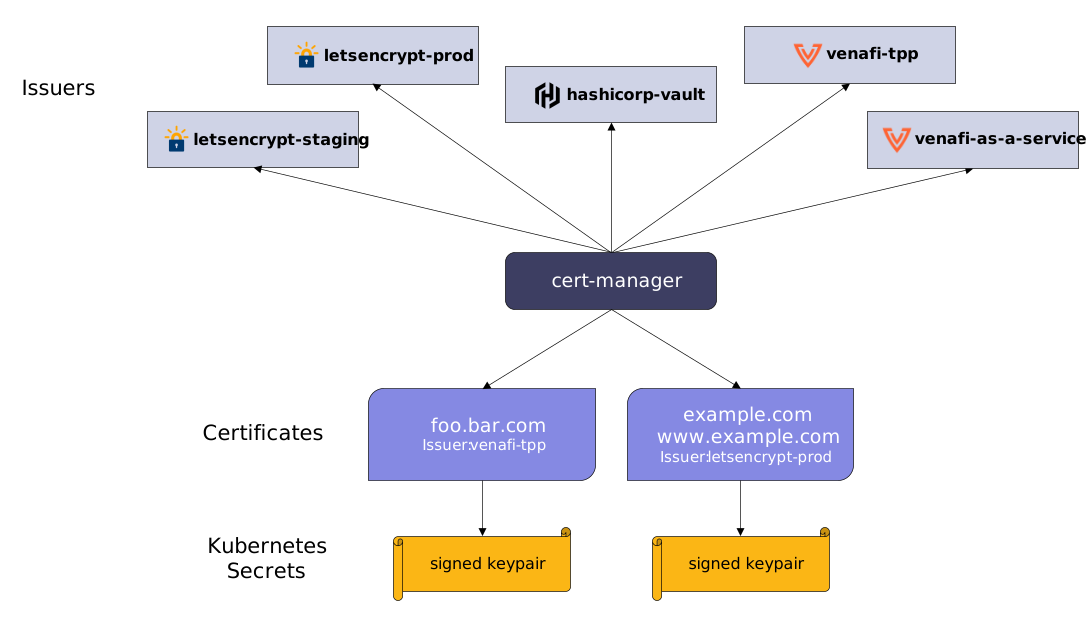
Different issuers provide different seal/unseal mechanisms. Except for self-signed, all others need to be configured with an external service. Supported types:
- SelfSigned
- CA
- Vault
- Venafi
- External
- ACME
You can use ACME mode, but it’s not required here.
AWS Secret Manager

Didn’t have enough resources to test this one, and compared to Vault it’s less feature-rich, so I skipped the experiment. That said, there’s real-world usage out there — GoDaddy uses it.
Kubeseal
Kubeseal is designed to encrypt your Secret into a SealedSecret, which is safe to store — even in a public repository. It has two parts: a client side and a server side. After installation, you encrypt locally with the client, and the server (which is a controller inside Kubernetes) handles decryption.
Here’s how it looks:

Secret In Actions
cert-manager
Step 1: Install
- With kubectl:
kubectl apply --validate=false -f https://github.com/jetstack/cert-manager/releases/download/v0.13.0/cert-manager.yaml |
- With helm:
helm repo add jetstack https://charts.jetstack.io |
Note: the official demo is outdated.
Step 2: Issuers with SelfSigned
If you want to use a different issuer, make sure it’s already installed. For example, if you’re using Vault as the issuer, you need to install vault-helm (the Vault agent server) first.
Vault

Step 1: Install Vault with helm
- vault-helm (Vault agent on Kubernetes):
git clone https://github.com/hashicorp/vault-helm && cd vault-helm |
Check out this tutorial.
- kubernetes-vault (Kubernetes Vault controller) — there are two approaches:

I followed this Quick Start to learn it:

Kubeseal with Kubernetes
Check the background section above for the workflow.
Step 1: Install
- Client:
wget https://github.com/bitnami-labs/sealed-secrets/releases/download/v0.9.7/kubeseal-linux-amd64 -O kubeseal |
- Server:
kubectl apply -f https://github.com/bitnami-labs/sealed-secrets/releases/download/v0.9.7/controller.yaml |
Step 2: Usage
i➜ kubeseal-guides ᐅ echo -n bar | kubectl create secret generic mysecret --dry-run --from-file=foo=/dev/stdin -o json >mysecret.json |
Before encryption — mysecret.json:
{ |
After encryption:
{ |
One thing to watch out for: if you can’t fetch the certificate, you may need to expose the service with kubectl expose service -n kube-system sealed-secrets-controller --type=ClusterIP.
Conclusion
Whichever solution you pick, you need to wire it into your deployment or patch it in. Whether it’s Cloud Security or Cloud Native Security, security-by-default and zero-trust principles are non-negotiable. Due to some constraints, I couldn’t include screenshots of every experiment — but I’d encourage you to run through them yourself.
Leaving off with a Chinese poem I love, and its translation:
有人住高楼,有人在深沟,有人光万丈,有人一身锈,世人万千种,浮云莫去求,斯人若彩虹,遇上方知有。——《怦然心动》
Some of us get dipped in flat, some in satin, some in gloss. But every once in a while you find someone who’s iridescent, and when you do, nothing will ever compare.