After Gemini 3 dropped, the quality of AI-assisted coding jumped significantly. Building products with AI help also got a lot cheaper. A feature that used to take one full sprint (2 weeks) can now be shipped in an afternoon or two. But honestly, having the right model and the right tools is only part of the story. The more important question is: do you actually know what you want to build, and can you get AI to build it? From GPT-3.5-turbo all the way to Gemini 3 Pro, the tools still need a human to drive them. The so-called “expert moat” keeps shrinking, but that just means security engineers need to get better at using these tools. So here’s a rundown of what I’ve picked up from a few years of AI-assisted coding.
0x01. Overall Design: Start with the Prompt
The more detailed your design, the more reliable the output.
The whole prompt engineering thing has been evolving alongside the models. Now that models can reason and think on their own, it might seem like prompts matter less. But that’s not really true. My take is that models have just gotten better at inferring your intent and planning the reasoning themselves. When you’re actually building a product, you still need a complete, well-thought-out prompt — unless you’re totally fine with whatever the model spits out and have no opinions of your own. This isn’t about prompt “tricks” either. It’s about using a prompt to fully describe what you want to build (everything below uses Cursor as the example).
Here’s how I typically break it down:
- Main tech stack: Since I’m most comfortable with Python, I always specify Python and tell the Agent which libraries to use. For B/S architecture products I typically require FastAPI, SQLAlchemy for the database, Cryptography for anything key-related, google-generativeai for Gemini integrations, the OpenAI library for other models, llama_index for local stuff, and an AI gateway library on the server side for multi-model support. This prevents the AI from pulling in random, outdated, or vulnerable libraries.
- Directory and file structure: A solid directory structure pays dividends when you’re adding features or hunting bugs, and it’s essential for multi-Agent coding (which gives you what effectively feels like a multi-person dev team). For Python projects I typically require: schemas, models, services, api, db directories, and if there’s task scheduling involved, a worker directory (which goes hand-in-hand with requiring Celery in the stack).
- Database: Since I’m already using an ORM, the specific DB type doesn’t matter much — migrations are easy either way. I’ll prototype locally with SQLite, then migrate to Postgres. The important thing is defining your DB schema early: which tables, which fields.
- Core business logic:
- Service capabilities: For a PKI service, for example, I’d spell out the CA capability, the certificate issuance flow (step 1: load/generate private key, step 2: validate CSR, step 3: sign the certificate, step 4: return PEM data), and for Encryption as a Service, I’d describe receiving a KeyObject/ID, how to decrypt, and returning nonce + ciphertext to the user. This kind of stuff usually lives in the services directory.
- API design: Whether or not you’re exposing the API externally, you should design it anyway — you need it for frontend/backend separation at minimum. Think about which endpoints are exposed, what the API schemas look like, what fields go in requests and responses.
- Security coding: This covers language-level stuff (avoiding common injection issues, separating secrets from config), business logic (e.g., decryption only happens in memory), and foundational features (user management, RBAC, SSO integration). In practice, this almost never gets addressed during the prototype phase — it gets layered in after the core functionality works. This is where having a solid directory structure really shows its value: you can bolt on security modules cleanly without rewriting everything. Engineering-grade code needs security built in. Security products especially need to be secure themselves. Honestly, not prioritizing this from the start is something worth reflecting on.
- UI basics: There are various approaches floating around online — clone a page, image-to-UI, etc. — but those are mostly demos and toys. When you’re building a real product, you need actual UI design. That said, you only need to specify the basics: what style framework (MUI, Tailwind CSS), which components and widgets. Don’t bother specifying CSS details like font sizes and colors upfront — you’ll adjust those in follow-up conversations anyway. (And you will adjust them, especially on the frontend.)
- Implementation steps: Tell the Agent the order to implement things (this section, combined with all the above, makes up a complete prompt). For example: start with the DB schema, then core business logic, then API endpoints, then the dashboard. Breaking it into steps guides how the Agent works.
⚠️ One alternative worth mentioning: you can describe your requirements to the model and have it design the details for you. Just tell it to use system thinking mode (even if the model can think on its own, it’s worth explicitly asking for system thinking, then splitting out its design output for you to validate and verify). You’d then shift your focus to refining requirements rather than writing technical specs. All the technical details become: “I need X, given input Y, I should get output Z.” Then review the whole prompt and hand it to Cursor. Click here to see a Prompt example — this was the initial version Gemini 3 generated from the design.
0x02. Fine-Tuning: Testing and Fixing Bugs
You must test/validate every feature the Agent writes and track down bugs. (You won’t really get what I mean below until you’ve actually gone through this yourself.)
Cursor Agent + Gemini 3 can generate solid code, but for complex products or lower-level logic, there will be bugs. 100%. This is exactly why I’ve been advocating for TDD in previous posts.
Below are categories of issues I’ve run into, along with tips and workarounds. (All of this applies to Cursor Agent + Gemini 3.)
- Package and path management issues
- A common one during Autorun is pip install failures. The fix: don’t use the system env, create a project-specific venv. Better yet, switch to uv (Use UV in cursor rules) and write a rule telling the Agent to use it.
- Command execution failures are usually caused by wrong paths. You can manually edit the command outside the sandbox autorun, or just use absolute paths everywhere.
- Model hallucination issues
- The model thinks it used a certain output. For example: the model is told to call a tool, get the result, and use it for next-step reasoning. Even though the tool call succeeds, the model outputs a “Simulated Report” instead. Fix: strengthen the system instructions to force the model to wait for real output and refuse to simulate. Also add wait time for the tool and require async tasks to only send results to the model after they’re complete.
- The model thinks it implemented something, but didn’t: classic example — CRL wasn’t written into the certificate, but the Agent confidently insists it did. Fix: point the Agent to the relevant standard (X.509 in this case) and drill into the lower-level processing steps. Reference back to the service capability prompt from section 0x01: when you need the Agent to implement specific business logic correctly, you sometimes have to spell out the lower-level mechanics to keep it on track.
- Business logic bugs
- Status display issues: Example — you have N RAG knowledge bases, you add a batch processing & index button, documents start updating one by one, but the overall “waiting” status never changes. Even after everything finishes, it still shows “waiting” and you need to manually refresh the browser. Fix options: add a status field tied to a session ID that refreshes, or separate out the API — for example, use a dedicated WebSocket endpoint for workflow status updates instead of cramming status markers into the model’s output stream.
- Complex architecture issues: Not as common with B/S, but B/C/S gets messy fast. For instance: a B/S management backend, plus a Client that registers to the Server for local capabilities, plus that Client listening on a local port as a browser extension server. Different language stacks, different module boundaries — it gets complicated. Fix: split into separate projects. B/S in one, Client in another, browser extension in a third. Or write a much more detailed prompt specifying exactly how each component interacts.
- DB table refresh: When new business logic changes the table schema, the Agent doesn’t automatically handle the migration (it only triggered the “fix business logic” mode, not the “sync schema to DB” mode). The main.py auto-reload then causes SQLAlchemy errors. Fix: spin up a dedicated Agent specifically for backend issues — dump all backend-related errors there. Then use another Agent to consolidate all DB operations (init, update) into one place.
- UI bugs: There are way too many to list.
- Cursor editor bugs
- After rejecting and reverting output, you adjust the prompt and drop one of the original requirements (say you go from 3 requirements to 2). Sometimes Cursor still remembers the old version (all 3). The Agent’s internal ToDo list didn’t update. Fix: when rejecting and adjusting requirements after a revert, be blunt in your prompt. Swear at it if you have to.
- Cross-project file modification — this one’s serious. I was in project A, started a new Agent, and told it to match the UI of
http://localhost:5174. It ended up modifying the code of the project running at 5174. During execution, I was clicking “allow” to let code run without realizing it was in the other project. I was confused because autorun normally handles this — I never have to click manually. Didn’t figure it out until 5174 threw errors. No real fix found for this one, only happened once. Just revert fast and adjust the prompt to only “check the UI” rather than “follow the style.”
One more category I didn’t go into detail on: UI-specific bugs. These vary so much by business logic and interaction design that they’ll keep appearing no matter what. For example, in a chat app: while waiting for a response from one conversation, if you click into another, all other UI windows might also show “waiting.” Or clicking on an agent in the UI always defaults to the first agent instead of the selected one. No universal fix here — you have to understand your own business logic first, then adjust.
When adjusting, the key is being able to precisely describe UI components — knowing what a widget, component, page, panel, module, box, window, and sidebar are, and being able to nail down position (within, under, in the left/right of, center, bottom, top, fixed, relative). Then saying things like “update xx style”, “follow xx style”, “move it”, “popup”, “alert it”, “double confirm”, “bring it into”. It’s basically being precise about what component goes where and what you want it to do.
But model hallucinations still happen here too. In one product, the header tab widths were off and kept covering other buttons. After 4–6 rounds of conversation, the model still insisted it had set x columns spanning x slots. Even after two rounds of venting at it and reviewing all the page code, nothing changed. I ended up going into the code directly and fixing it by hand. That fix got locked into style rules after.
On the language side: using English for prompts in Cursor is genuinely more effective. Even if the model can handle Chinese, I’ve tried adjusting UI in Cursor with Chinese and Gemini 3 — the results weren’t great. Also, use MAX mode instead of Auto when you can. Keep in mind that some models (Sonnet 4.5 for example) default to 200K context, and with MAX mode it supports 1M — but anything over 200K racks up fast. One conversation could run you $1–2. So be explicit and specific with your prompts.
0x03. Style Transfer: Learning Rules
If you’ve followed along and actually tried the prompts and bug fixes above, you can already ship a working product. But if you want to scale that into a recognizable product line with consistent style, you need Cursor Rules.
You can also have the Agent extract the style from a product you already like. (This means you can prototype a minimal product first to validate backend style, frontend style, and other conventions — then document it all for future projects.)
Have the Agent output your frontend style:
@Codebase I want to reuse the frontend style and component patterns from this project in a new project that will have a completely different backend. |
Have the Agent output your backend style:
@Codebase Act as a Senior Software Architect. I want to start a new project and I want to strictly follow the coding style, architectural patterns, and best practices established in this current backend codebase. |
Save those outputs as frontend-style.mdc and backend-style.mdc, then create a .cursor/rules folder in your new project and put them there. If you’ve run into package management issues or unfixable header problems like I have, also create python-package-management.mdc and header-fix-style.mdc. Just don’t make individual rule files too long.
My recommended rule categories:
- Backend coding style
- Frontend coding style
- Package management conventions (e.g., prefer uv for Python packages)
- Secure coding conventions
Here’s an example of my backend coding style rules:
|
Good coding conventions actually mean good architectural design. New features slot in faster, and models need fewer tokens to figure out what to do. It also makes running multiple Agents in parallel much more feasible. But the start of any product is never the code — it’s the requirements. The space between requirements and product is full of a different kind of design thinking and trade-offs.
0x04 Side Notes
Whether it’s “talk is cheap, show me the code” or “code is cheap, show me the prompt” — times change, tools change, but humans still have to drive them. I keep hearing the same complaint from friends who’ve gone all-in on AI coding: “Before, I spent most of my time writing code and not much debugging. Now the AI writes code fast but debugging takes two or three days.” There’s no such thing as 100% perfect implementation — probability distributions don’t work that way. But AI coding has genuinely accelerated prototyping, which lets you focus more on delivering the actual requirements rather than getting lost in implementation details. That said, it’s not really the right fit for large-scale projects.
I started experimenting with AI coding after GPT-3.5 Turbo launched. But after Gemini 3 showed up, I realized that using it for large projects was no longer out of the question.
My previous AI Studio API key was only Tier 1, so I upgraded to Cursor’s $20/month plan — which ran out fast. Then I switched to $60/month — still not enough. Opened $50 of On-Demand credit, burned through $40+ in under two days. Eventually bit the bullet and went with the $200/month plan.
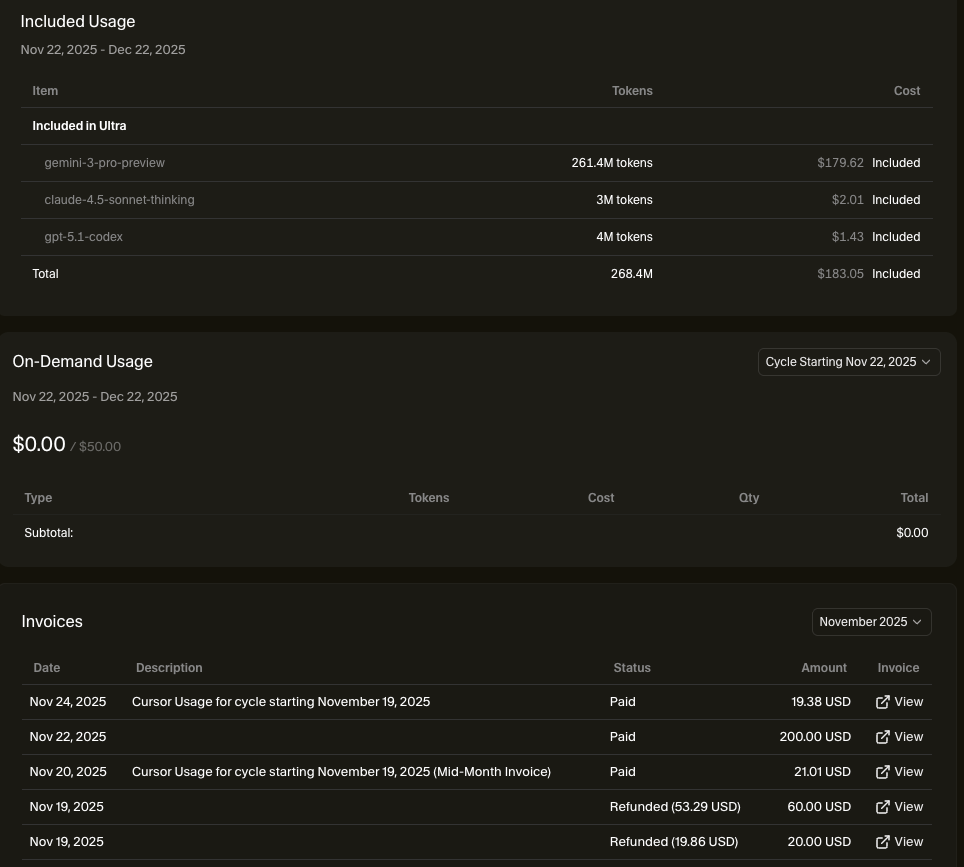
When I did the math against what actually got built though, the cost-to-value ratio is actually solid. (The screenshot only shows one week — I was probably actively coding for about 5 days.)
Here are some screenshots of recent product UIs (the stuff I’ve been building lately finally feels like actual products rather than tools or services):
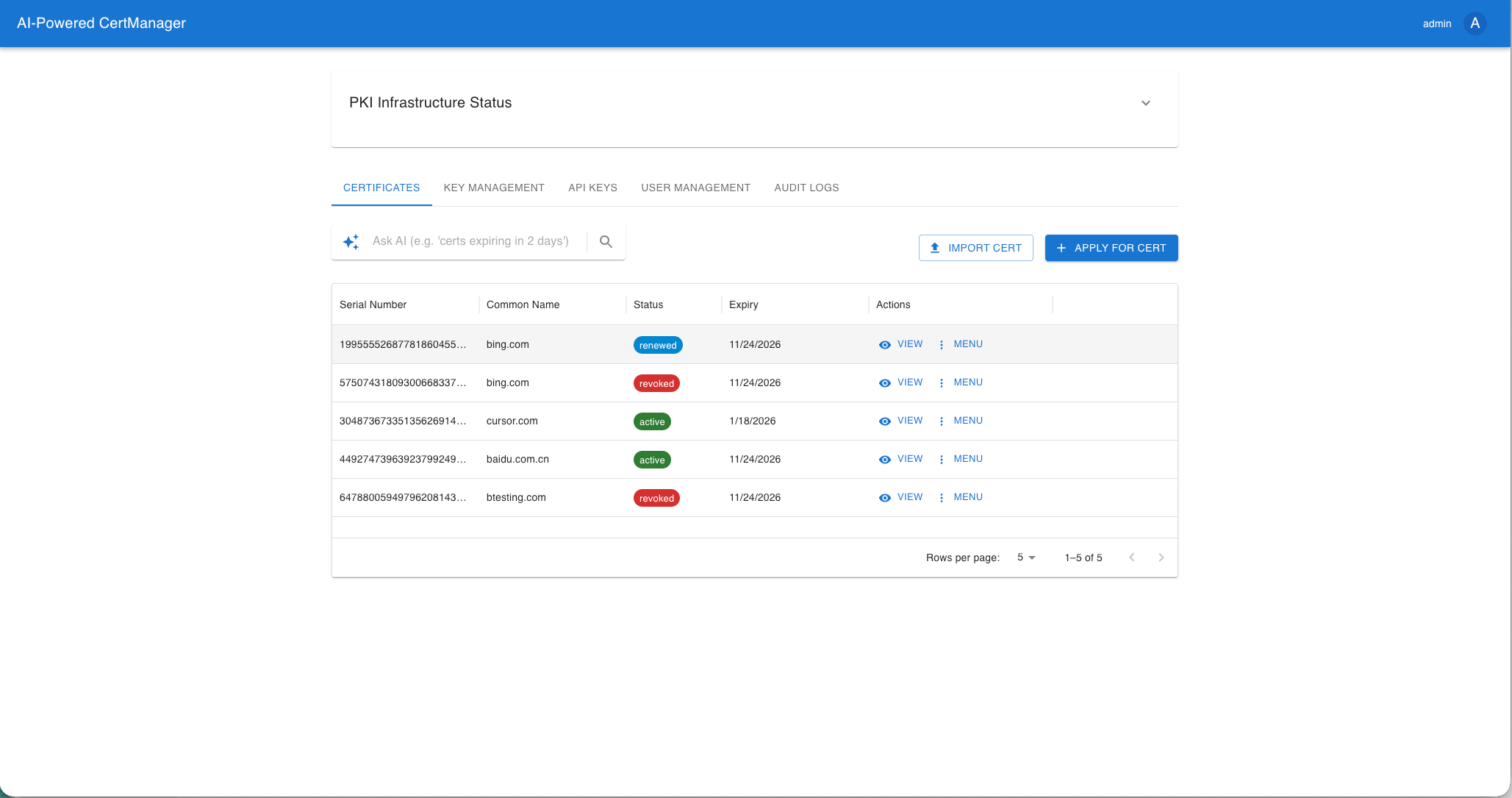
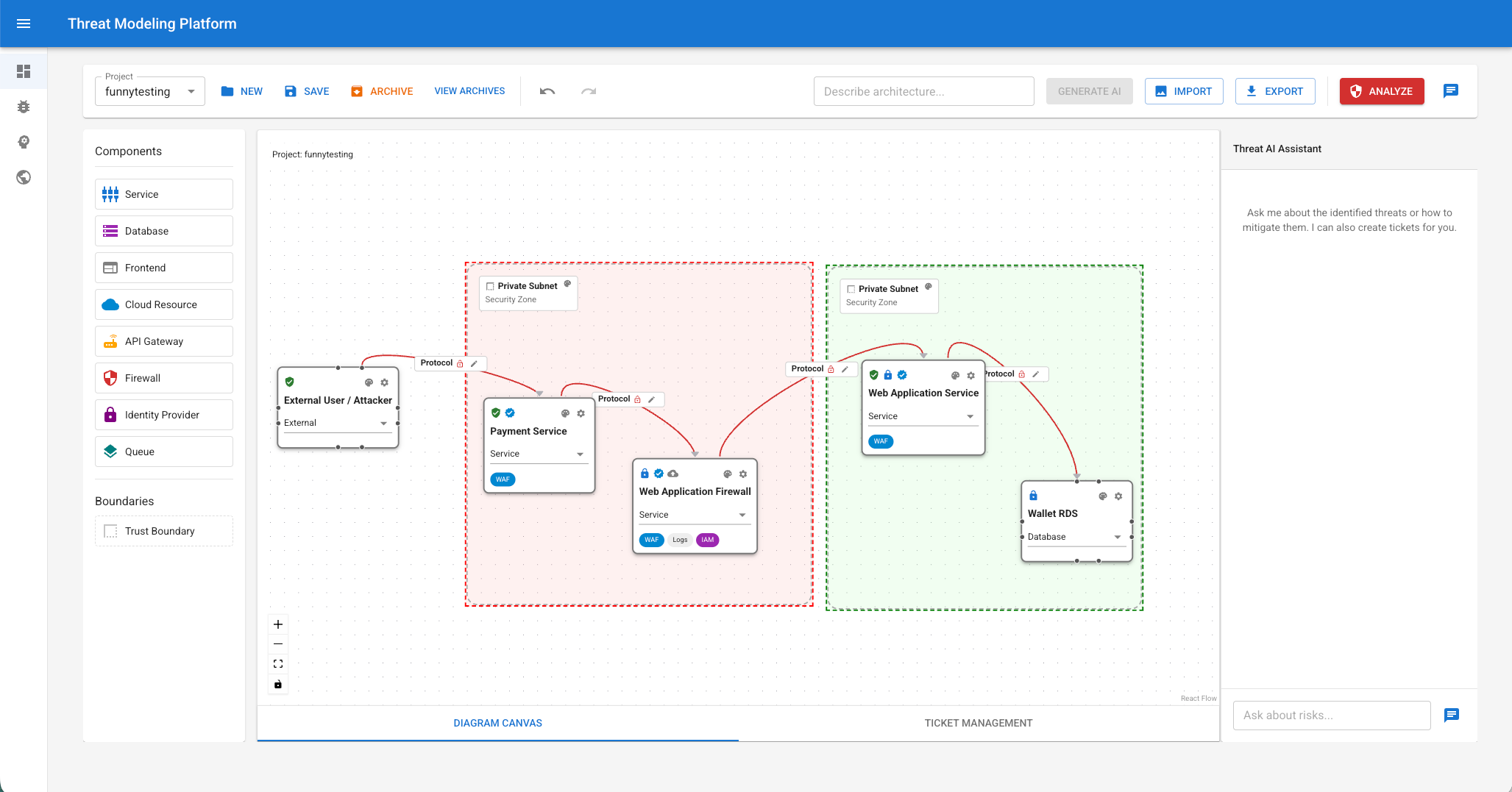
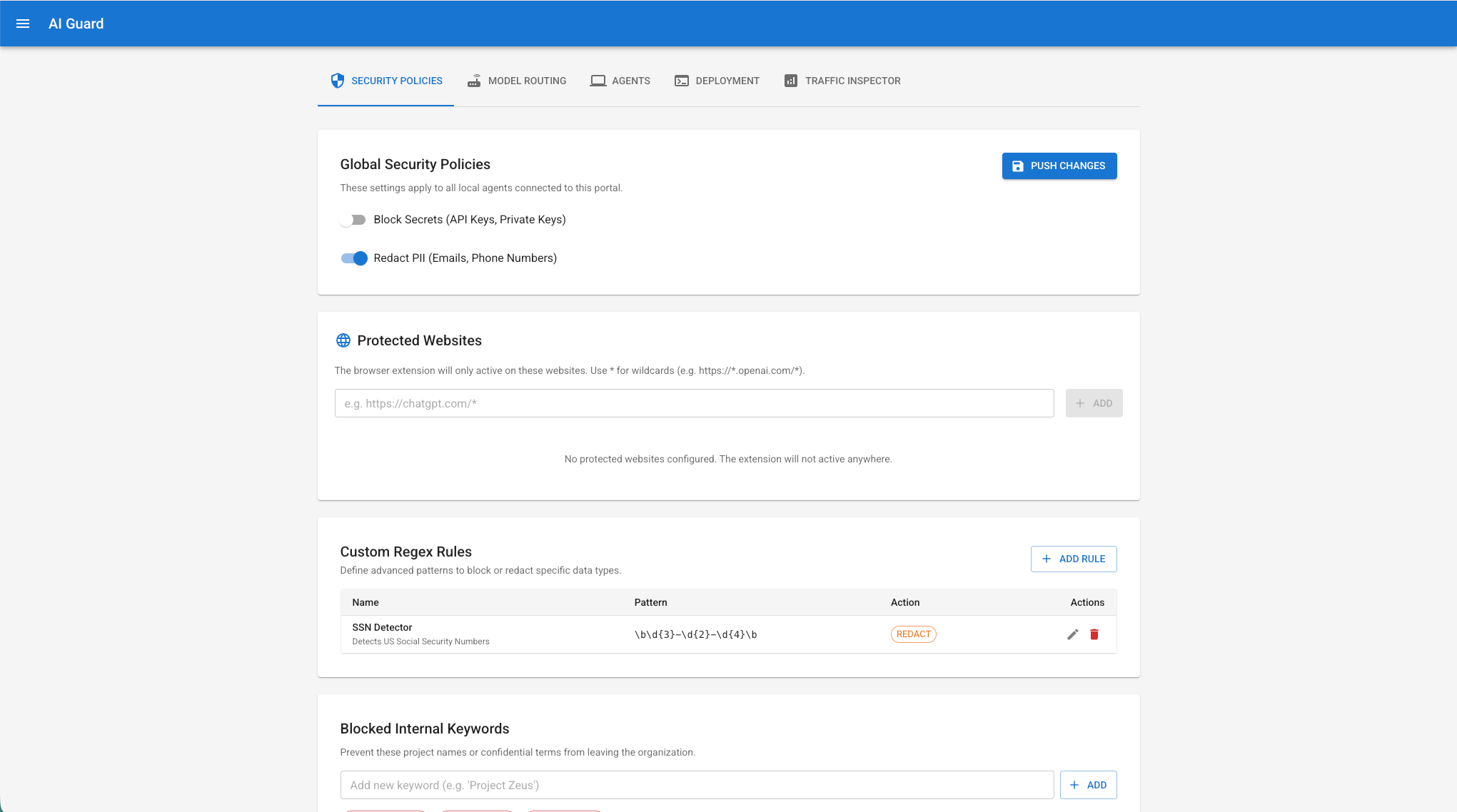
I originally planned to write a summary on AI-driven product design back in April, revised the plan in July (split out Python coding into its own piece). I was going to finish “AI Coding and Product Design Practices” today, but by the time I got through the product design section it was already way too long. So I’m cutting it here. Product Design Thoughts — continued in the next post!

Below are some other tools I’ve built with AI, from the original outline (listed in rough chronological order — none of them feel as much like real products as the recent stuff shown above):
- Web-based Code Review tool (Python+Flask — paste code, get vulnerability analysis and code review; backend is GPT-4o)
- Miscellaneous work utilities (HTML-based)
- Mac reading bot (Python-based — screenshot any part of a PDF you don’t understand, the bot does summary & research in the background; backend is GPT-4o)
- Apple Watch six-line divination (Yijing hexagram) app (Swift, Cursor editor)
- Random hexagram web page (a web-based particle sword-flight-style effect — I have no CSS skills, this was 100% AI; I never learned the CSS it wrote, which shows)
- CISSP exam tool (pure frontend, JS+React; built different versions with Claude 2.7 and Gemini 2.5)
- AI Browser (Node.js+Electron — the idea was a browser cockpit where AI receives real-time browser context and provides analysis)
- Vault platform (Python+Flask, Java+Javalin — supports EAAS, multi-CA integration, certificate management, and organizational certificate issuance; AI can compress 300 person-days into 30)
- Backtesting platform (Python+streamlit — a small visualization tool for common strategy backtesting)
Beyond those, some web style adjustments (blog, book-list site, etc.), security center landing pages similar to SRC, and a few product prototypes:
- Solution Craft (a platform for managing the full product development lifecycle, designed to bring in different departments for resource management, with SDLC and DevSecOps built in by default, supporting mappings for multiple frameworks)
- Aladdin’s Lamp (a mental health platform focused on left-behind children)